Showing posts with label Grid Control. Show all posts

Tuesday, October 4, 2011

Grid Control 11g - 2 small improvments

I installed Oracle Grid Control 11g months ago and left it with typical configuration. Recently it becomes a little bit unstable and did a quick audit. Here are my first 2 finding but and will do a deeper dive into into if only I will find some more time.

Memory settings
In default configuration of Weblogic Management server running Grid Control instance maximum number of Java stack memory (parameter -Xmx) is unset and it is using default value of 512 MB. It is too small for big installation with many agents and concurrent users. Weblogic configuration allow users to set USER_MEM_ARGS variable with Java memory settings in starting script which will be used instead of MEM_ARGS variable. I has goint to change startManagedWebLogic.sh file as I want to keep default values for admin server but I found better solution on  Oracle Enterprise Manager blog in "Increasing the JAVA heap size of the OMS" section. Instead of startManagedWebLogic.sh you need to edit startEMServer.sh file
and add following section just before last line
if [ "${SERVER_NAME}" != "EMGC_ADMINSERVER" ] ; then
   USER_MEM_ARGS="-Xms256m -Xmx1024m -XX:MaxPermSize=512m -XX:CompileThreshold=8000 -XX:PermSize=128m"
   export USER_MEM_ARGS
fi
Log rotation
It was very typical for old Oracle Application Server or Grid Control 10g that logs weren't rotated in default configurations. I have seen this many times when I have been asked to do some troubleshooting. After installation of Grid Control 11g together with Weblogic I was thinking how many logs has been left without rotation this time. Most of them looks OK but I found one mod_wl_ohs.log belonging to WebTier (Oracle HTTP server) which is still not rotated. This log file is configured in this configuration file mod_wl_ohs.conf and it is quite easy to add rotation to it. As all rotated Apache logs this line
WLLogFile ${ORACLE_INSTANCE}/diagnostics/logs/${COMPONENT_TYPE}/${COMPONENT_NAME}/mod_wl_ohs.log
should be started with rotatelog command:
WLLogFile "|${ORACLE_HOME}/ohs/bin/rotatelogs ${ORACLE_INSTANCE}/diagnostics/logs/${COMPONENT_TYPE}/${COMPONENT_NAME}/mod_wl_ohs.log 43200"

Update:
Oracle Enterprise Manager 12c (like Cloud) has been just officially presented. There is still not documentation but you can download and install it.
regards,
Marcin

Friday, April 23, 2010

Grid Control 11.1- new directories structure

New Grid Control has a different design of directory structure on disk.
During installation process you have been asked for two paths
  • Middleware home
  • Instance base
Let’s take a closer look on new structure.

Middleware Home - set to /u01/Middleware

This is directory where Weblogic server has been installed and according to Grid Control Installation documentation
Oracle Middleware Home is the parent directory that has the Oracle WebLogic Server
home, the Web tier instance files, and, optionally, one or more Oracle homes.
This is where the OMS and the Management Agent are deployed.
After Grid Control installation process you will see following structure in that directory:
[oracle@piorovm Middleware]$ du -s -h *
1.4G    agent11g      
4.0K    domain-registry.xml   
172M    jdk160_14_R27.6.5-32  
187M    jrockit_160_14_R27.6.5-32  
8.0K    logs       
121M    modules      
4.0K    ocm.rsp      
3.4G    oms11g       
895M    oracle_common     
887M    Oracle_WT      
60K     registry.dat     
4.0K    registry.xml     
444K    user_projects     
26M     utils       
518M    wlserver_10.3    
As you can see the following directories are part of Grid Control:
  • agent11g - Agent Oracle Home     
  • oms11g - OMS Oracle Home         
  • oracle_common    
  • Oracle_WT - WebTier
Rest of directories are part of Weblogic server.

Instance base - set to /u01/gc_inst

According to Oracle Installation documentation:
Oracle Management Service Instance Base Location is the directory under the parent directory of the Oracle Middleware Home, where the configuration files of OMS a restored.
Let see what is inside
[oracle@piorovm gc_inst]$ du -s -h *
1.4M    em        
895M    user_projects     
53M     WebTierIH1      
Short description:
  • em - sysman configuration and logs files – equivalnet of old OMS ORACLE_HOME/sysman directory
  • user_projects – deployed OMS server application – equivalent of old OMS ORACLE_HOME/j2ee directory
  • WebTierIH1 – web tier - equivalent of old OMS ORACLE_HOME/Apache
Log files

As Grid Control has a new directory structure all log files has been moved to different directories too. Please find some new location of well know logs:
  • Agent trace and log files -
    /u01/Middleware/agent11g/sysman/log/
  • OMS trace and log files -
    /u01/gc_inst/em/EMGC_OMS1/sysman/log
  • Domian log -
    /u01/gc_inst/user_projects/domains/GCDomain/servers/EMGC_ADMINSERVER/logs/GCDomain.log
  • Weblogic OMS server --
    /u01/gc_inst/user_projects/domains/GCDomain/servers/EMGC_OMS1/logs
  • Weblogic Admin server -
    /u01/gc_inst/user_projects/domains/GCDomain/servers/EMGC_ADMINSERVER/logs
Where:
  • /u01/gc_inst - is a Instance Base
  • GCDomain is a Weblogic domain name


As you can see there are two Weblogic servers – if you are familiar with Weblogic you know that there should be always at least two – one is a Admin server and next servers (can be more than one) are management servers and those servers are running applications. In our case server EMGC_OMS1 is a management server and OMS software is running on it.
In relation to old Oracle Grid Control we can say that new admin server is a equivalent of HOME OC4 container and new management server called EMGS_OMS1 is a equivalent of  EM OC4J container.

Grid Control maintenance

Automatic start:

An additional file has been added to Linux starting scripts (/ect/init.d/gcstartup) and it is staring
Grid Control infrastructure. Keep in mind that unlike to Grid Control 10g this script doesn’t include database. It is DBA responsibility to start a database before this script will be started.

Manual start:
To start Grid Control we need to use emctl tool from oms11g Oracle Home.
[oracle@piorovm oms11g]$ ./bin/emctl start oms
Oracle Enterprise Manager 11g Release 1 Grid Control
Copyright (c) 1996, 2010 Oracle Corporation.  All rights reserved.
Starting WebTier...
WebTier Successfully Started
Starting Oracle Management Server...
Oracle Management Server Successfully Started
Oracle Management Server is Up
[oracle@piorovm oms11g]$

Status:
From maintenance point of view OPMN functionality has been reduced to WebTier only and management server can be start and stop only via emctl utility.
[oracle@piorovm oms11g]$ ./bin/emctl status oms
Oracle Enterprise Manager 11g Release 1 Grid Control
Copyright (c) 1996, 2010 Oracle Corporation.  All rights reserved.
WebTier is Up
Oracle Management Server is Up
[oracle@piorovm oms11g]$

WebTier
Let’s try to check HTTP status using a old OPMN process
[oracle@piorovm ]$ cd /u01/Middleware/oms11g
[oracle@piorovm oms11g]$ ./opmn/bin/opmnctl status
opmnctl: ORACLE_INSTANCE is not set.
opmnctl status requires that ORACLE_INSTANCE be correctly set in your environment.
Make sure you are using ORACLE_INSTANCE/bin/opmnctl, or set ORACLE_INSTANCE
in your environment.
Ok let’s set this environment variable and check again.
[oracle@piorovm oms11g]$ ./opmn/bin/opmnctl status

Processes in Instance: instance1
---------------------------------+--------------------+---------+---------
ias-component                    | process-type       |     pid | status
---------------------------------+--------------------+---------+---------
ohs1                             | OHS                |   11538 | Alive

Now I can try to restart WebTier process if needed
[oracle@piorovm oms11g]$ ./opmn/bin/opmnctl stopproc
opmnctl stopproc: stopping opmn managed processes...
[oracle@piorovm oms11g]$ ./opmn/bin/opmnctl status

Processes in Instance: instance1
---------------------------------+--------------------+---------+---------
ias-component                    | process-type       |     pid | status
---------------------------------+--------------------+---------+---------
ohs1                             | OHS                |     N/A | Down

[oracle@piorovm oms11g]$ ./opmn/bin/opmnctl startproc
opmnctl startproc: starting opmn managed processes...
[oracle@piorovm oms11g]$ ./opmn/bin/opmnctl status

Processes in Instance: instance1
---------------------------------+--------------------+---------+---------
ias-component                    | process-type       |     pid | status
---------------------------------+--------------------+---------+---------
ohs1                             | OHS                |   18227 | Alive

Agent

There is no changes to agent startup process - only Agent Oracle Home has a different location.
 
[oracle@piorovm agent11g]$ pwd
/u01/Middleware/agent11g
[oracle@piorovm agent11g]$ ./bin/emctl start agent
Oracle Enterprise Manager 11g Release 1 Grid Control 11.1.0.1.0
Copyright (c) 1996, 2010 Oracle Corporation.  All rights reserved.
Starting agent ................................... started.
[oracle@piorovm agent11g]$

Saturday, April 17, 2010

Grid Control 11.1- Installation - OEM

Hello,

Welcome in part 2 of my series about Grid Control 11g.
In the first part I have described how to install Weblogic server which is a one of main components of new Grid Control.
Second required component is a database in releases described in previous post too.I have used 11.1.0.7 with default settings.
According to installation document (included in zip files from eDevlivery) and checks performed by OUI during my installation following parameters has to be set in my database:
open_cursors 300 or greater
processes 500 or greater
session_cached_cursors 200 or greater
log_buffer 10485760 or greater
Next thing is to delete existing database console repository and delete whole db console configuration. This is checked by OUI too so it is better to do it before start.
emca -deconfig dbcontrol db -repos drop

If you are installing Grid Control on RedHat 5.2 (it was my case) in addition to all packages required for 11gR1 database you will need following package:

compat-db-4.2 
I have used that rpm compat-db-4.2.52-5.1.i386.rpm This a package with libdb used by webserver.

Space requirements:
  • Weblogic - installed in previous part about 1 GB
  • Grid Control - required space is 8.4 GB 
    • about 7 GB is installed in Middleware home
    • rest in OEM home
  • Database - about 1 GB for new tablespaces
After that we can start with installation.
  1. OUI start - ./runInstaller


  2. Confirm that you don't need MOS - at least during installation


  3. Basic installation - without any additional patches


  4. New installation - we don't have any existing Management Services yet


  5. All prerequisites are met


  6. Middleware home loction has to be set to Weblogic installation, OMS location is a directory for Grid Control - see disk spaces requirement above


  7. Provide username and password for new Weblogic domain and password for Node Manager. Weblogic domain can be compared to OC4J but you can have more then one server in domain. Node Manager is a host based tool used for domain management.


  8. Provide database details like hostname, listener port and sys password. OUI will check if database meet all required prerequisites now.


    I have deleted DB Console but still got following error - after 2 compilations I just clicked continue. When you drop DB Console repository SYSMAN user should be dropped too - so I don't think it will be a problem.


  9. Enter password for SYSMAN user and path for tablespace files


  10. Registration password for agent and security settings


  11. Ports summary - all ports in one page and easy to edit


  12. Last review


  13. Installation - cafe time ;) it took about 1 hour on my laptop


  14. Root part of work - all in one script


  15. And at least - OEM configuration - another long running process


  16. This is it - yes if you are here you have Grid Control installed


This is all for that post. I have almost no time after installation to play with new Grid Control but I have a free weekend so I hope I will spend some time on investigating it and I hope to blog about it.

regards,
Marcin

Thursday, April 15, 2010

Grid Control 11.1- Installation - Weblogic server

Hello

New Grid Control 11g has been released a view days ago (see my previous post with links).I have spend some time downloading it and now is time to share my installing experience.
First of all you have to know that unlike in previous version of Grid Control, new one is shipped without application server and without database.Both of them has to be downloaded and installed separately.
This a list of all necessary Oracle products:
  • Oracle Database - 10.2.0.4, 11.1.0.7, 11.2.0.1 plus required patches - see Grid Control Basic Installation Guide 
  • Weblogic 10.3.2 with patches - I was unable to find required patch but decided to try without it
  • certified operating system - Oracle Enterprise Linux 4, 5.x or RedHat Linux 4, 5.x
I'm wondering what is inside this package Grid Control 10g has about 2.5 GB including database and application server. Grid Control 11g has 4.2 GB without application server (1 GB) and database server (4 GB for Oracle 11gR1).
Let's start with prerequisites.I assume that everybody has database up and running and I will start with Weblogic server. I have some experience with Weblogic version 7 and 8 and I have been very excited to see a new version of it.
  1. Download a Weblogic server - I have used Package installer which has everything inside one package

  2. Login as oracle and start ./wls1032_linux32.bin process

  3. Welcome screen appear - Click Next


  4. Choose Middleware Home and click Next


  5. Confirm that you don't need to configure My Oracle Support


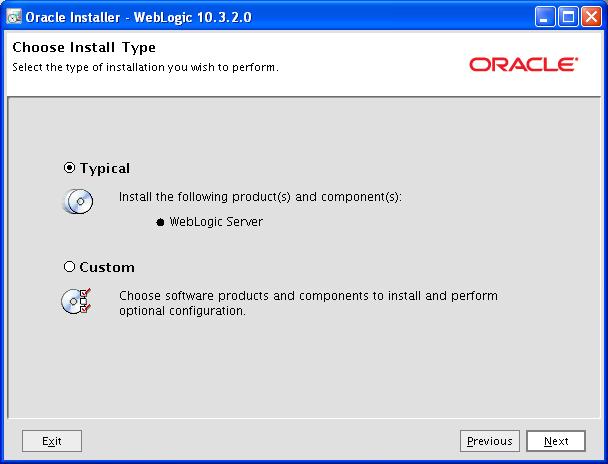
  6. Choose installation type


  7. Confirm Weblogic directory


  8. Installation summary - click Next


  9. Take some - installation in progress


  10. Installation has been completed - We don't need to configure any Weblogic domain now so we can skip Quickstart.


If everything was well you should have all necessary components (database and Weblogic server) to start Grid Control installation. Next post will cover check of database parameters and Grid Control installation. See you soon.


Marcin

    Monday, April 12, 2010

    Grid Control 11.1

    Hi,

    Grid Control 11.1 on Linux platform is available to download from Oracle E-delivery. 
    Thanks to Marco Gralike and Rob Zoeteweij.

    There are 3 disks - about 4.2 GB in total - so be aware before you download it. You will need a lot of space for test. Grid Control 11.1 is based on Weblogic server and it need 2 GB of RAM.
    According to disk space and memory requirements it is laptop killer.

    regards,
    Marcin